Advice
Published:
February 27, 2025
Updated:
April 17, 2026

Email Disclaimers: Examples, Best Practices & How to Add One to Your Signature

By
Amandine Fernandez
Head of Marketing & Communications
Ever scrolled to the bottom of an email and noticed a block of text about confidentiality, liability, or compliance?

That’s an email disclaimer, and while it might seem like a formality, it actually plays a big role in protecting businesses from legal risks, ensuring regulatory compliance, and maintaining professional communication.

From confidentiality notices to GDPR compliance disclaimers, this guide covers everything you need—what they are, why they matter, and how to craft the perfect email disclaimer, complete with ready-to-use templates for seamless implementation.

Let’s dive in!

Understanding Email Signature Disclaimers

disclaimer-email-explanation

An email signature disclaimer is a legal statement that typically appears at the end of an email, within the signature block. Its primary function is to limit liability, inform recipients of their rights, and safeguard sensitive information.

A disclaimer can cover several legal aspects, including:

  • ‍Confidentiality – Protecting sensitive or private information.‍
  • Non-binding clauses – Preventing unintended contractual obligations.‍
  • Data protection (GDPR, HIPAA, etc.) – Ensuring compliance with global regulations.‍
  • Security warnings – Notifying recipients about potential risks (e.g., phishing, malware).

While disclaimers add a layer of legal protection, they are not always legally enforceable. Their effectiveness depends on the content, clarity, placement, and applicable legal jurisdiction.

Legal Implications of Email Disclaimers

Are Email Disclaimers Legally Binding?

The enforceability of an email disclaimer varies depending on:

  • ‍Jurisdiction – Different countries have different laws on disclaimers.‍
  • Clarity & Placement – A disclaimer buried at the bottom of an email thread may not hold up in court.‍
  • Legal Context – Some disclaimers (e.g., confidentiality notices) may support legal claims, but they don’t override existing laws.

The best way to strengthen your disclaimer’s impact is to consult legal counsel to ensure compliance with industry-specific regulations.

Why a Confidentiality Clause is Necessary

With increasing cybersecurity threats and data privacy concerns, a confidentiality clause in an email disclaimer is more critical than ever.

Key Benefits:

  • ‍Protects sensitive data from unauthorized disclosure.‍
  • Provides a legal basis for action in case of breaches.‍
  • Reinforces best practices in email security.

While a disclaimer won’t prevent data breaches, it reinforces accountability and can serve as evidence of intent in legal cases.

Different Types of Email Disclaimers

Email disclaimer types

GDPR Compliance and Email Disclaimers

Under the General Data Protection Regulation (GDPR), email disclaimers help businesses demonstrate their commitment to data privacy and compliance.

They serve as an avenue for businesses to demonstrate their commitment to the principles of data protection and privacy. GDPR-compliant email disclaimers should clearly outline how personal data is collected, stored, and processed.

Despite the lack of definitive rules for GDPR email disclaimers, incorporating the following key elements can help to showcase GDPR compliance:

A GDPR-compliant disclaimer should include:

  1. ‍Privacy policy link – Inform recipients about data usage.‍
  2. Recipient rights – Outline rights under GDPR (e.g., access, rectification, deletion).‍
  3. Unsubscribe option – Allow recipients to opt out of marketing emails.‍
  4. Contact information – For data protection queries

Remember, it's best to get legal advice when drafting GDPR email disclaimers to ensure full compliance.

HIPAA Regulations and Email Disclaimers

The Health Insurance Portability and Accountability Act (HIPAA) imposes strict regulations on healthcare organizations regarding the protection of patient's Protected Health Information (PHI).

HIPAA-compliant email disclaimers thus serve a vital role in maintaining this compliance. They inform recipients that the email may contain PHI, and is not entirely secure, thereby placing responsibility on the receiver for any subsequent disclosure of information. A correctly formulated disclaimer can help prevent unauthorized access or distribution of PHI.

Example:
This email may contain confidential health information protected by law. If you are not the intended recipient, please notify the sender and delete this email immediately.

To ensure HIPAA compliance, consider incorporating these elements in your email disclaimer:

  • Notice of confidentiality: State that the email may contain confidential health information.
  • Warning against unauthorized use: Caution recipients against unauthorized use, disclosure, distribution, or copying of the contained information.
  • Misdelivery disclaimer: Instruct recipients who received the email in error to notify the sender and delete the email.

Tip: While disclaimers help with compliance, they do not replace proper security measures like email encryption.

Safety Messages in Email Disclaimers

Safety messages within an email disclaimer play a pivotal role in promoting responsible online communication by highlighting potential risks and advising on safe practices. They underscore the importance of cybersecurity, drawing attention to threats like phishing, malware, or data breaches.

For instance, a safety message can warn recipients to verify an email's source before opening any attachments or clicking on any links, to guard against phishing scams. It might also remind users to keep their antivirus software up to date to protect against potential malware.

Example:
Beware of phishing attempts! Always verify the sender before clicking links or downloading attachments.

These messages can be tailored to your organization's specific safety concerns or the nature of your email content. They are typically brief, clear, and positioned prominently within the email to ensure they are not overlooked.

Remember, while safety messages are valuable tools, they do not replace the need for robust cybersecurity measures within your organization.

Zoom on The Importance of Confidentiality Notices

Confidential email disclaimer

Examples & Sample Texts of Effective Confidentiality Notices

Now that we've covered the importance of confidentiality notices, let's delve into some effective examples. Remember that these are only examples. The content of your confidentiality notices should be tailored to suit your specific legal requirements.

Example 1:
"This email and any files transmitted with it are confidential and intended solely for the use of the individual or entity to whom they are addressed. If you have received this email in error, please notify the system manager."

Example 2:
"The information contained in this communication is strictly confidential and intended only for the use of the individual or entity named above. Unauthorized use, disclosure, or copying is strictly prohibited and may be unlawful."

Example 3:
"This message is confidential. It may also be privileged or otherwise protected by work product immunity or other legal rules. If you have received it by mistake, please let us know by email reply and delete it from your system."

Example 4:
"CONFIDENTIALITY WARNING: This communication and any attachments may contain confidential and privileged information for the sole use of the designated recipient(s). If you are not the intended recipient, you are hereby notified that any disclosure, copying, distribution, or use of this email is prohibited. If you have received this email in error, please notify the sender immediately and delete it."

Example 5:
"CONFIDENTIALITY NOTICE: The contents of this email message and any attachments are intended solely for the addressee(s) and may contain confidential and/or privileged information and may be legally protected from disclosure. If you are not the intended recipient of this message or their agent, or if this message has been addressed to you in error, please immediately alert the sender by reply email and then delete this message and any attachments."

Example 6:
"CONFIDENTIAL: This email and any files transmitted with it are confidential and intended solely for the use of the individual or entity to whom they are addressed. If you are not the intended recipient, you are advised that disclosing, copying, distributing or taking any action in reliance on the contents of this information is strictly prohibited."

Pro Tip: The easiest way to automatically include confidentiality notices in all company emails is by using an email signature management solution like Letsignit.

The below sample texts offer a starting point for crafting your own confidentiality notices. Remember, these should be adjusted according to your legal advice and specific needs.

How Do I Add a Disclaimer in an Email Signature?

Adding a disclaimer to your email signature is essential for legal protection and compliance, but manually inserting it in every email can be time-consuming and inconsistent. The best approach? Automate it across your entire organization for uniformity and control.

For Individual Email Signatures (Manual Method)

If you're adding a disclaimer on a personal level, follow these steps:

In Outlook:

  1. Open Outlook → Go to File > Options > Mail‍
  2. Click Signatures under the "Compose messages" section
  3. Click New, then enter your disclaimer text‍
  4. Format as needed and apply to new messages and/or replies‍
  5. Click OK to save

In Gmail:

  1. Open Gmail → Go to Settings > See all settings‍
  2. Scroll to the Signature section
  3. Click Create New and add your disclaimer text‍
  4. Format as needed and save

While this works for individuals, manually managing disclaimers across an entire company is a challenge—especially when compliance is at stake.

The Best Way to Add Disclaimers Company-Wide: Use Letsignit

For organizations, the most efficient and reliable way to add disclaimers is to deploy them automatically with an email signature management tool like Letsignit.

With Letsignit, you can:
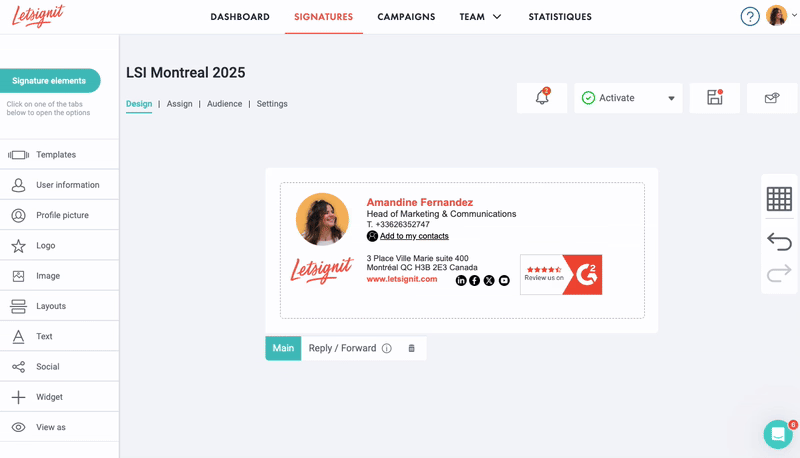
  1. Apply disclaimers globally to all company emails—no manual updates needed.
  2. Ensure legal compliance with GDPR, HIPAA, and industry regulations.
  3. Standardize disclaimers across departments for a professional and consistent look.
  4. Make real-time updates without employees needing to adjust settings.
Discover Letsignit

How to Add a Disclaimer with Letsignit

Letsignit Email Disclaimer Generator Example

In just a few clicks, you can:

  1. Log into Letsignit and access the signature editor
  2. Select the "Disclaimer block" feature
  3. Choose from pre-designed templates or create a custom disclaimer
  4. Deploy it across the entire company or assign different disclaimers by department
  5. Make real-time updates instantly applied to all employees
‍Why it matters: With Letsignit, you eliminate the risk of employees modifying or forgetting disclaimers. Every email sent is compliant, professional, and legally sound—without any manual effort.

👉 Want to automate email disclaimers across your organization? Try Letsignit today!

Email Signature Disclaimer Examples

Email signature disclaimers

Confidentiality Disclaimer

"This email and any files transmitted with it are confidential and intended solely for the use of the individual or entity to whom they are addressed. If you have received this email in error, please notify the sender immediately and delete this email from your system. Any unauthorized use, disclosure, or distribution is strictly prohibited."

Legal Protection Disclaimer

"The information contained in this email is for general information purposes only. While we endeavor to keep the information up to date and correct, we make no representations or warranties of any kind, express or implied, about the completeness, accuracy, reliability, or suitability of the information contained in this email."

HIPAA Compliance Disclaimer

"This message may contain confidential health information protected by law. If you received this message in error, please delete it immediately and notify the sender. Any unauthorized disclosure, copying, or distribution of this information is strictly prohibited and may be subject to legal action under HIPAA regulations."

Personal Opinion Disclaimer

"The views and opinions expressed in this email are those of the author and do not necessarily reflect the official policy or position of [Company Name]. Any content provided by our employees, partners, or contributors are of their own opinion."

Non-Binding Contract Disclaimer

"This email does not constitute a binding offer, acceptance, or agreement. No contractual relationship is established by this communication unless and until a formal written agreement is signed by authorized representatives of both parties."

Environmental Disclaimer

"Please consider the environment before printing this email. If you do need to print, please print double-sided."

Virus Warning Disclaimer

"This email has been scanned for viruses and malware. However, we cannot accept responsibility for any loss or damage arising from the use of this email or attachments."

GDPR Compliance Disclaimer

"Your privacy is important to us. This email may contain personal data protected under the GDPR. By continuing to communicate with us via email, you acknowledge our privacy policy (available at [website]). To understand how we handle your data or to exercise your rights, please contact our Data Protection Officer at [email]."

Professional Services Disclaimer

"The information provided in this email is intended for informational purposes only and does not constitute professional advice. Please consult with appropriate professionals before making any business, legal, or financial decisions."

Marketing Email Disclaimer

"This email was sent to [email address] because you subscribed to our mailing list. To unsubscribe from future communications, click here or reply with 'UNSUBSCRIBE' in the subject line. [Company Name], [Address], [City, State, ZIP]"

Creating an Effective Email Disclaimer Template

Email disclaimer template

What Makes a Strong Email Disclaimer?

  • Concise & clear – Avoid overly complex legal jargon.
  • Legible formatting – Use a font style and size that ensures readability.
  • Consistent branding – Match your company’s signature style.
  • Automatically applied – Use an email signature tool like Letsignit for seamless integration.

Remember, while a well-crafted disclaimer can play a crucial role in managing legal risks, it's not a foolproof shield against all legal liabilities. Always seek legal advice when drafting your disclaimers.

Email Disclaimer Generators: Pros and Cons

Using an email disclaimer generator can be a quick and efficient way to create legally sound disclaimers. But is it always the best option?

How to Use an Email Disclaimer Generator

  1. Choose a reliable generator
  2. Enter details such as company name, industry, and jurisdiction.
  3. Select additional options like GDPR and HIPAA compliance.
  4. Review the generated disclaimer and customize it to match legal requirements.

Tip: Generators are great for speed, but they shouldn’t replace professional legal counsel.

When You Need a Customized Disclaimer

Not all businesses can rely on generic disclaimers. You might need a customized disclaimer if:

  • You operate in regulated industries (e.g., healthcare, finance) with strict compliance laws.
  • You frequently share sensitive or proprietary data that requires additional protections.
  • Your organization works internationally, requiring disclaimers that comply with multiple jurisdictions.

Key takeaway: If your email communications involve high-risk data or legal implications, get your disclaimer reviewed by an attorney.

Common Mistakes When Using Generators

Even with automation, mistakes can weaken your disclaimer:

  • Misunderstanding legal requirements – Not aligning with industry-specific laws.
  • Over-reliance on templates – Failing to tailor disclaimers to specific business needs.
  • Not updating disclaimers – Laws evolve, and so should your disclaimers.
  • Skipping professional advice – A legal expert should always review disclaimers before implementation.

Avoiding these mistakes ensures your disclaimers remain compliant and effective.

Distributing Emails with Disclaimers to Intended Recipients

To ensure disclaimers are effective, follow these best practices:

  1. Verify recipient details – Avoid accidental data leaks.
  2. Use BCC for mass emails – Protect recipient privacy.
  3. Ensure all outgoing emails include disclaimers – Automate this for consistency.
  4. Remind recipients of confidentiality – Reinforce responsible email practices.

Email Footer: The Ideal Place for Your Disclaimer?

The positioning of your email disclaimer is crucial for its effectiveness. The email footer generally serves as the ideal location for your disclaimer. Why the footer?

  1. It’s the last thing recipients see, making it easy to locate.
  2. It doesn’t disrupt the main message, keeping communication clean.
  3. It’s separate from the signature, avoiding visual clutter.

Ensure your disclaimer is clear, concise, and visibly distinct.

The Role of an Attorney in Drafting Email Disclaimers

The role of an attorney in drafting email disclaimers is both multifaceted and essential. Their legal expertise helps ensure that the disclaimer is comprehensive, precise, and aligned with legal requirements, reducing potential risks for your organization.

A legal expert can:

  • Identify key areas of liability – such as confidentiality, employee liability, or attorney-client privilege—and tailor the disclaimer accordingly.
  • Ensure compliance with GDPR, HIPAA, or other relevant regulations, minimizing legal exposure.
  • Advise on placement and visibility, making sure the disclaimer is properly formatted and easy to spot in emails.
  • Guide enforcement strategies, providing insight into the steps to take if the disclaimer is violated.

Important: While a well-drafted disclaimer adds a layer of legal protection, it does not replace the need for professional legal advice in case of disputes or regulatory concerns.

Take Control of Your Email Disclaimers Today

Email footer disclaimer

Manually managing email disclaimers across an organization can be a hassle, leading to inconsistencies, compliance risks, and wasted time. With Letsignit, you can centralize, automate, and standardize disclaimers for every employee—ensuring that each email is legally compliant, professionally formatted, and always up to date.

Ready to simplify email signature management and compliance?

‍Request a demo today and see how Letsignit can transform your email communication! 🚀

‍

About the author
Amandine is the Head of Marketing & Communications at Letsignit. Originally a content specialist, she now plays a key role in boosting Letsignit's brand awareness and growth. A true Letsignit veteran (over seven years and counting!), she crafts marketing projects and campaigns that reflect a sharp vision, strong storytelling, and boundless creativity. Fun fact: If you ever visit Marseille, you’ll likely spot her hanging out on the rocks at Vallon des Auffes—any time of the day! 🌊☀️
About Letsignit
Letsignit is an email signature management solution that allows organizations to transform their employees' email signatures into a powerful 1-1 engagement medium for their brands and campaigns.

Frequently asked questions

1

What are examples of disclaimer statements?

Common email disclaimers include:

  • Confidentiality Disclaimer: This email and any attachments are confidential and intended for the named recipient(s) only.
  • GDPR Compliance Disclaimer: Your privacy is important to us. Learn more in our privacy policy [link].
  • Legal Protection Disclaimer: This email’s content is for informational purposes only and should not be considered legal advice.

Each disclaimer should be tailored to your company’s legal needs.

‍

2

What is a good disclaimer for an email?

A good disclaimer is clear, concise, and legally relevant. It should:

  • Define the email’s intended audience
  • Highlight confidentiality or data protection terms
  • Include legal disclaimers (e.g., non-binding agreements, liability limitations)

For consistency, add it to your email signature so it appears in every message.

3

Is it a legal requirement to have an email disclaimer?

Not always, but in industries like finance, healthcare, and legal services, disclaimers are often required for GDPR, HIPAA, or confidentiality compliance. Even when not legally mandatory, they help limit liability and reinforce security policies.

4

Can I create my own email disclaimer instead of using a template?

Yes, but ensure it is legally sound and specific to your business needs. While templates provide a useful starting point, customizing your disclaimer with legal counsel ensures compliance with relevant regulations.

5

How to add disclaimer in outlook?

You can add a disclaimer manually in your email signature settings:

  1. Open Outlook → File > Options > Mail‍
  2. Click Signatures, create a new one, and insert your disclaimer
  3. Save and set it as your default signature

For company-wide disclaimers, admins can set up a global rule in Exchange Admin Center under Mail Flow > Rules > Apply disclaimers.

For an easier, automated solution, use Letsignit to manage disclaimers across all employees’ emails!

6

How can I manage and update my email disclaimer templates?

The easiest way to manage and update email disclaimers across an organization is by using a centralized tool like Letsignit.

Instead of relying on employees to manually insert or update disclaimers, Letsignit allows businesses to automate the process, ensuring that every email includes the correct legal notice.

With real-time updates, IT or marketing teams can modify disclaimers instantly and apply changes company-wide without individual intervention. This guarantees compliance with regulations like GDPR or HIPAA while maintaining a professional and consistent brand identity in all corporate communications.


7
8

Your employees already represent your brand. Every day, across every interaction.

Make sure every interaction stays on brand.
Start governing your brand